



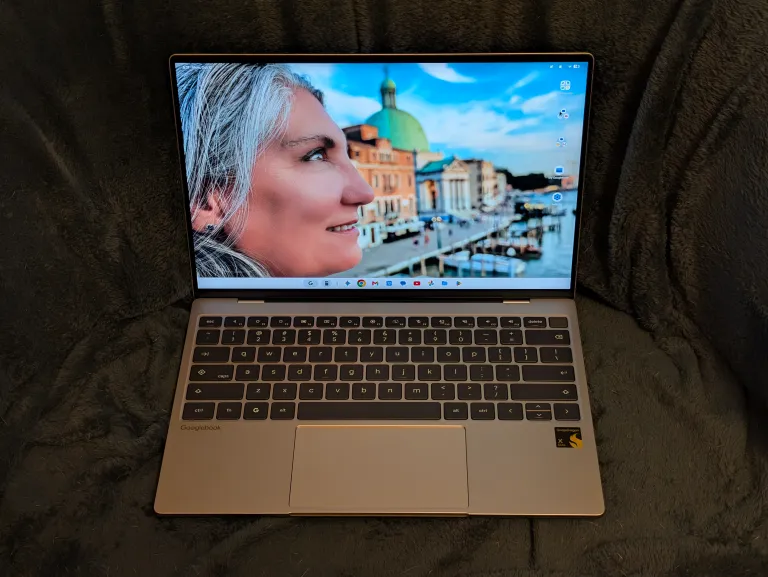
As someone who has, over the years, found himself deep in the Google ecosystem of hardware and services, I had been curious about the Googlebook concept for a while — whether it would be basically a fancy Chromebook, or if it would offer something more, and more useful, than that line of affordable but mostly limited laptops. When the Googlebook models were announced in September, I decided to go ahead and pre-order one: The Acer Googlebook 14.
It turns out, however, that apparently lots of people had the same idea as me. Best Buy sent me an email telling me that despite taking my pre-order money, the Acer was out of stock and they didn’t know when they would get more. I cancelled that order and went with the Dell XPS Googlebook instead, which, I think by virtue of being $100 more expensive than the Acer, was in stock. It arrived the day after I ordered it — and when, alas, I was away at New York Comic Con for a few days. I finally got a chance to set it up and play with it yesterday.
My first impressions: It’s pretty nice! Also, Google still has work to do on its shiny new operating system.
Hardware first: The XPS Googlebook is a really nice little laptop. It’s physically the smallest of the five Googlebooks available at launch (the other four coming from Acer, Asus, Hewlett-Packard and Lenovo). It’s clearly meant to be in the “ultrabook” category of laptop, which is to say, light and thin and not terribly concerned with ports (it comes with two USB-C ports and that’s it — not even a headphone jack). It’s also the only Googlebook at launch that does not come with an OLED screen, although the screen it has is perfectly nice and the blacks are certainly inky enough for government work.
All of the launch Googlebooks were required by Google to have certain minimum hardware: at least 16GB of RAM, high-speed processors, either by Intel or Qualcomm (the XPS comes with a Snapdragon X Elite), 512GB SSD, a metal, not plastic, chassis, backlit keyboard, and a touchscreen with a high refresh rate (120 Hz here). None of this comes cheap these days, and the initial set of Googlebooks are priced between $899 and $1299, with the XPS I got coming in at $999. This is more expensive than just about any Chromebook, more expensive than the new Macbook Neo, and on par with a newish Macbook Air.
The minimum requirements pay off, at least for the XPS. It feels really solid for such a small computer, and everything about it looks and feels nice. The keyboard has a nice snap to it and has almost no flex, the screen as mentioned is very good (and comes with an anti-glare coating, which is a feature I appreciate now that I have it), and while it has fans, which turned on while I was setting up the laptop, they are quiet and barely noticeable when they’re on, which so far has only been during that setup.
As mentioned the processor here is a Snapdragon chip rather than an Intel one, and that’s fine because Android (which the Googlebook OS is based on, and which, frankly, it’s mostly just a reskinned version of) is designed to run on ARM chips, which Snapdragon is. Everything runs quickly so far, and ARM chips are typically meant to be more efficient than x86 chips like Intel’s, although so far the battery life I’ve seen out of the XPS is good but not amazing.
The XPS has quirks — the keyboard is a modified Chromebook set-up, which means the Caps button is a “search” button first (you can make it a Caps button by holding down the shift button, which defeats the whole purpose of a caps button), and there’s a “Google” button on the bottom row which opens an app drawer or can be used to access the “magic pointer” (more on that later). Also, the speakers, while perfectly acceptable, make the chassis vibrate, particularly the trackpad, which is a not entirely pleasant feeling. The trackpad is mechanical, not haptic, and the click does take some pressure (it responds to taps perfectly well). The I/O situation as mentioned is sparse, but inasmuch as I already have a MacBook Air, which also only has two USB-C ports, I am already well-acquainted with the dongle life, and I have bluetooth headphones. I’m not going to give the XPS too much crap for that.
So as a piece of hardware, the XPS is solid. Now, how is the software — the Googlebook operating system and all the “AI” bells and whistles that Google has piled on top of it?
Well…
As a preface, I should note that I knew going into this that as an early adopter of this platform, I would essentially be a beta tester for it, since almost no 1.0 release of anything survives its first encounter with users out in the world. In the week since Googlebooks have hit the market there have already been updates to the OS to fix bugs and other flubs. So I’m okay with having a little patience in this shake-down cruise. That said, being patient doesn’t mean not pointing out the flaws that do currently exist.
One of those flaws is that at the moment the Googlebook is doing a crap job at one of its marquee features, namely, integration with Android phones, where one is supposed to be able to connect laptop and phone seamlessly, stream apps from the phone to the laptop, hand off work from one to the other, and drop files from one into the other painlessly. As a Pixel phone owner, this promised integration was a huge inducement to try out the Googlebook — I wanted what (presumably) iPhone users have with their Macs. It would, in fact, be really useful. And as a Pixel owner running Android 17, I am someone best positioned to get that integration right out of the box.
Except that the Googlebook keeps dropping its connection to my phone and not being able to find it after that, unless I restart both the phone and the Googlebook. It happens when I take my phone away from the laptop and/or close the laptop, breaking the connection between the two. A short disconnect doesn’t seem to be a problem; a longer one seems to flummox it entirely. I believe this is a known issue that’s being addressed, so that’s good. But it’s still annoying right now. I don’t want to have to keep resetting my laptop and phone to get the promised integration.
(I’ve also noticed that phone apps streamed onto the Googlebook can have choppy scrolling, although I don’t know if that’s a problem with the integration or an artifact of my occasionally-janky internet connection.)
That said, when the integration does work, it’s pretty neat, and I see it being really useful when I’m working on my laptop and need something from my phone, or want to access an app that I don’t have running natively on my computer. As mentioned already, the Googlebook OS is pretty much a reskinned version of Android 17, so all the apps that run on an Android phone should run just fine on the laptop (there are apps that apparently struggle on the Intel Googlebooks, but even there something like 97% of apps run perfectly well). During the setup, if you pair your Googlebook with your phone it will install the apps you have there over to the laptop, so you’ll be able to run them natively even if you can’t access your phone. But they are different instances of the app, so streaming an app might still come in handy.
So: Great in concept! Execution still needs work.
Google is going all in on “AI” integration on the Googlebooks, making sure that Gemini, its in-house “AI,” is only a click, button-mash or cursor wiggle away, the latter being the “magic pointer” feature. You can invoke Gemini and ask it about what’s on your screen, or have it smoosh two images you have into a single “AI”-ified picture and so on (the Googlebooks also come with an offer for an entire year of the “Pro” level of Gemini, which comes with five terabytes of cloud storage, which is arguably more useful). The point is, no matter where you go on the Googlebook OS, Gemini is right there, lurking, waiting for you to do something with it.
I’m not going to get into a deep discussion about the various issues with “AI” for this overview; if you want to know my current(ish) feelings about it, you can go here and catch up. What I will say is that at this point Microsoft, Apple and Google are all jamming as much “AI” as they possibly can into their operating systems, so if you want an entirely “AI”-free compute experience, you’ll probably need to head to some distribution of Linux or another — and that’s a totally valid choice if you do, maybe this will finally be The Year of Linux after all. But I suspect most normies will stay in the MSFT/Apple/Google universes, so the question there is: If one must be stuck with “AI” festooned about one’s computing life, which version is the most useful.
I think at the moment it’s Google that has best integrated its “AI” features into its ecosystem as a useful tool and not just a shiny bauble to rook the rubes. Microsoft, of course, fucked up its Copilot integration so badly that now it’s pretending it never even happened, while Apple’s “AI” was so famously flubbed over such a long period that its latest iteration of “Apple Intelligence” is just Gemini in a black turtleneck. There is some irony in Google being better than Apple at both tech and UI with anything, but here we are. 2026 is a hell of year.
For all that, even in my brief experience of the Googlebook OS, there’s nothing here that demands Gemini use. It’s around, to be sure. Oh, boy, is it ever. But you don’t really have to use it for anything. You can access apps and do your work without ever having to invoke Gemini. Yes, it can make little widgets for you, or vibe code something for you, or take a picture of your cat and put a witch hat on it for spooky season or whatever. Or, you could just leave it alone and never bother with it, and your Googlebook experience will be just fine without Gemini.
And in fact, of all the things that Gemini is supposed to do on the Googlebook, there is only one feature that I actually find useful in any measure: Rambler. It’s the new voice dictation program that takes all the “ums” and “ahs” out of your speech when you are doing voice-to-text, and creates a coherent statement that requires minimal editing on the backend. It’s been super useful when I’m trying to plow through a whole bunch of email, and it’s easier to say something than to type something. It’s the one thing out of basically years of Google “AI” that I think actually earns its keep. It’s not exclusive to Googlebook — it’s on Pixel phones as well — but it’s especially useful in the laptop milieu. Also, Rambler seems like to me it could be a really excellent accessibility feature, although I would need other more knowledgeable people in that area to confirm that.
Having discussed the hardware and the software, the question now is: Is a Googlebook actually useful — as in, is it a laptop that could replace your Mac or Windows laptop?
Ehhhhh… maybe? But probably not?
While the Googlebook is substantially more useful and capable than a Chromebook, it suffers from the same issue that Chromebooks did: Some significant programs are just not there, or aren’t fully featured. Again, think of Googlebooks as Android laptops. They have access to everything in the Google Play Store, which is actually pretty great — but not everything in the Google Play Store is a feature-complete version of that software. The Android version of Word, which I use to write novels, isn’t close to feature-complete, nor is the Web browser version. The Android version of Photoshop isn’t feature-complete either (nor again is the Web browser version). I can write in Android’s Word, and I can do some photo editing in Android’s Photoshop. But substantive detail work is out of reach. If there’s software you need the feature-complete version for, and need it on a regular or daily basis, then the Googlebook is probably not for you, at least not yet.
But, if most of the things you do can be done through phone apps or the browser, and/or you’re deep into the Google ecosystem (and use, for example, Google’s suite of business apps instead of Microsoft’s), and you’re willing to tolerate Google working the kinks out of its new operating system on you for the next several months, then, actually, yeah, it’s worth taking a look at the Googlebook. I can personally see taking this with me when I’m traveling, when I’m not doing a huge amount of work and therefore my need for feature-complete programs is at a minimum. I did this before with my Chromebooks, and this XPS is a lot more robust, both in terms of hardware and software, than those ever were.
(If you’re porting over from a Chromebook, or porting over, say, your tech-unsavvy mom or dad from that platform, then this is a very good, if currently slightly expensive, upgrade to that experience. Be aware that Google is promising to support Chromebooks through 2034, and presumably later generations of Googlebooks will have cheaper options, so there’s not a huge rush at the moment to move over to a Googlebook.)
Plus, again, Rambler really is a killer app. I genuinely see me using my Googlebook to plow through emails and doing other things where dictation would be faster and better than typing. It’s not for writing fiction or long-form pieces like this, I would note; that takes a part of my brain that’s better integrated with my hands, and yes, that’s a real thing. But really short pieces, social media and emails? Absolutely. I’ll be happy to save my wrists for the things that make me money. This is one part of living in the future I think is worth it.
(By John Scalzi for WHATEVER)